Commercial DC chargers are no longer isolated machines beside a parking space. They connect vehicles, payment systems, cloud platforms, building networks, and maintenance teams. That wider connection creates useful efficiency, but it also creates more points to protect.
Ken Munro, a cybersecurity researcher at Pen Test Partners, describes electric vehicle chargers as “computers with a big plug attached.” The phrase is simple. It is also easy to underestimate. A damaged cable, exposed network port, or reused administrator password can interrupt charging across a busy site. Security must therefore begin before installation and continue through daily operations.
This guide explains How to secure commercial DC charging stations through layered, practical controls. It examines physical protection, secure configuration, identity management, network separation, firmware updates, payment safeguards, and incident response. Operators should use encrypted communications, unique credentials, multi-factor authentication, and monitored access logs. They should also test failover procedures with real technicians, not only trust a dashboard.
Small details matter. Lock the cabinet. Inspect the connector. Review an overnight alert. Train the contractor.
Standards such as NIST guidance, OCPP security profiles, and relevant electrical requirements can support better decisions. However, compliance alone does not guarantee resilience. A station may pass an inspection and still expose an outdated interface. That uncomfortable gap deserves attention.
No security plan is permanent. Charging hardware changes, software evolves, and attackers adapt. The strongest approach combines proven controls with regular questioning: What can fail, who can access it, and how quickly can service recover?
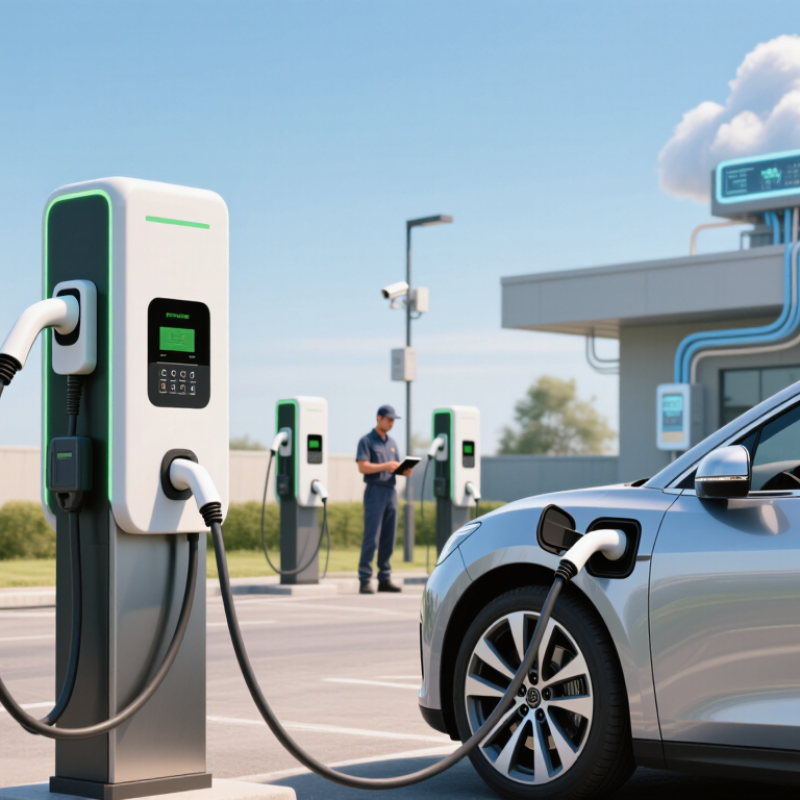
Commercial DC charging stations are becoming critical business infrastructure, not simple electrical equipment. The International Energy Agency’s Global EV Outlook 2024 reports more than four million public charging points worldwide by the end of 2023. Public chargers grew by about 40% that year. Each connected station can expose payment systems, driver accounts, operational networks, and building controls.
Risk assessment should begin at the charging cabinet. Technicians need to inspect exposed ports, outdated firmware, shared administrator accounts, and unsupported remote access tools. ENISA’s Cybersecurity Challenges in the Uptake of Electric Vehicles identifies communication links, backend platforms, and mobile applications as important attack surfaces. A compromised station could display false status information, interrupt fleet schedules, or spread access into a corporate network. Small oversights matter.
Network separation is essential. Charging equipment should use a restricted network, multifactor authentication, signed software updates, and continuous logging. The 2024 Verizon Data Breach Investigations Report found vulnerability exploitation increased by 180% as an initial access method. That broader figure should concern charging operators, even though it does not measure chargers alone. Security teams should also test emergency shutdown procedures and review supplier access quarterly. Perfect protection is unrealistic. Many sites still prioritize uptime over evidence collection, which may delay detection. Physical locks, sealed cabinets, camera coverage, and documented maintenance records add practical protection when digital controls fail.
| Security Risk Area | Typical Attack or Failure Scenario | Primary Assets at Risk | Likelihood (1–5) |
Impact (1–5) |
Risk Score | Recommended Security Controls | Verification Measures | Residual Risk |
|---|---|---|---|---|---|---|---|---|
| Unauthorized network access | An attacker reaches the charging station management interface through an exposed service, insecure remote-access path, or poorly segmented site network. | Charging operations, site network, payment environment, customer data | 4 | 5 | 20 High |
Use network segmentation, deny-by-default firewall rules, private management paths, multi-factor authentication, and removal of unnecessary services and ports. | Perform external and internal vulnerability scans, firewall-rule reviews, service inventory checks, and penetration testing at least annually and after major changes. | Medium |
| Weak operator authentication | Shared accounts, default passwords, excessive privileges, or inactive administrator accounts allow unauthorized configuration changes. | Station configuration, user accounts, firmware, transaction records | 4 | 4 | 16 High |
Require unique user IDs, phishing-resistant multi-factor authentication where practical, role-based access, password rotation after suspected compromise, and prompt offboarding. | Review privileged accounts monthly; confirm access rights against job roles; test login, lockout, session timeout, and administrator audit logging. | Low |
| Insecure communications | Charging stations exchange commands, status information, or payment-related data over unencrypted or weakly authenticated connections. | Control commands, credentials, telemetry, payment and customer information | 3 | 5 | 15 High |
Encrypt communications using current secure transport protocols, validate certificates, disable obsolete cryptographic protocols, and protect keys in managed storage. | Inspect protocol configurations, certificate chains, cipher suites, expiration alerts, and machine-to-machine authentication logs. | Low |
| Malicious or compromised firmware | Unauthorized firmware is installed, or a legitimate update is modified during transfer or deployment. | Charging controller, power-conversion functions, safety systems, network trust | 3 | 5 | 15 High |
Use digitally signed firmware, secure boot where supported, protected update channels, version allowlists, rollback capability, and documented emergency patch procedures. | Verify signature enforcement, maintain firmware inventories, record update results, and test recovery from failed or interrupted updates. | Medium |
| Payment and personal-data exposure | Payment details, vehicle identifiers, account information, or charging-session records are retained or transmitted beyond operational necessity. | Payment data, customer identity, vehicle or session metadata, privacy compliance | 3 | 5 | 15 High |
Minimize collected data, tokenize payment information, encrypt sensitive records, restrict administrator visibility, define retention periods, and separate payment systems from charger control networks. | Conduct data-flow mapping, retention reviews, access-log analysis, vulnerability assessments, and documented incident-response exercises. | Medium |
| Physical tampering | An unauthorized person opens the enclosure, connects to a maintenance port, removes storage media, or interferes with cabling and safety components. | Control electronics, credentials, safety mechanisms, availability | 3 | 4 | 12 Medium |
Use locked enclosures, tamper switches, protected service ports, secure cable routing, restricted cabinet keys, surveillance, and documented maintenance access procedures. | Inspect physical controls during scheduled maintenance; test tamper alerts; reconcile keys and service-port access; investigate unexpected enclosure events. | Low |
| Denial-of-service and service disruption | Repeated connection attempts, malformed messages, network flooding, or misuse of station controls prevents drivers from starting or completing sessions. | Station availability, revenue, customer service, grid-support operations | 4 | 4 | 16 High |
Apply rate limiting, network filtering, resource quotas, redundant communications where justified, local safe-operation modes, and tested recovery procedures. | Monitor availability and failed-session rates; test failover and restart behavior; define service-level thresholds and escalation timelines. | Medium |
| Unpatched software and vulnerable components | Known vulnerabilities in operating systems, embedded software, libraries, web interfaces, or network components remain exploitable. | All connected systems, station availability, confidentiality and integrity | 4 | 4 | 16 High |
Maintain a software and hardware inventory, track vulnerability advisories, prioritize internet-facing and critical components, test patches, and document compensating controls. | Measure patch age, scan coverage, unsupported components, remediation time, and exceptions with accountable owners and expiration dates. | Medium |
| Unsafe command or configuration changes | A compromised account or integration sends unauthorized charging, load-management, pricing, or availability commands. | Electrical safety, equipment health, energy costs, customer transactions | 3 | 5 | 15 High |
Use command authorization, least privilege, input validation, configuration baselines, change approval, dual control for high-impact actions, and safe operating limits. | Review command logs, compare configurations with approved baselines, alert on unusual power or pricing changes, and test rollback procedures. | Medium |
| Insufficient monitoring and incident response | Suspicious authentication, firmware, configuration, or charging events are not detected quickly enough for effective containment. | Detection capability, evidence, service continuity, regulatory response | 4 | 4 | 16 High |
Centralize security logs, synchronize system time, define alert priorities, retain evidence securely, assign incident roles, and maintain isolation and recovery playbooks. | Test alerting and escalation quarterly; measure detection and response times; conduct tabletop exercises and post-incident lessons-learned reviews. | Medium |
| Third-party integration and supply-chain risk | A connected service, maintenance provider, software component, or remote support channel introduces an unmonitored vulnerability or unauthorized access path. | Management platform, integrations, credentials, software integrity | 3 | 4 | 12 Medium |
Maintain supplier security requirements, limit integration permissions, use time-bound support access, require vulnerability disclosure processes, and review component provenance. | Perform supplier assessments, access reviews, software composition checks, contract reviews, and verification of service-account activity. | Low |
| Backup and recovery weakness | Configuration, certificates, transaction records, or operational data cannot be restored after ransomware, equipment failure, or a major security incident. | Availability, recovery time, operational continuity, audit records | 3 | 4 | 12 Medium |
Use encrypted, access-controlled backups; keep an offline or logically isolated copy; define recovery objectives; and document replacement-station procedures. | Perform restoration tests at least annually and after major architecture changes; record recovery time, data completeness, and unresolved dependencies. | Low |
Check cables, connectors, cooling systems, emergency stops, and visible damage. Keep access lanes clear. Confirm emergency contacts are posted nearby.
Stop charging if a connector overheats, alarms repeat, insulation looks damaged, or water reaches electrical components. Do not touch exposed conductors.
Use the approved disconnect to isolate the equipment. Restrict the area and contact qualified electrical personnel. Record the charger ID, time, symptoms, weather, and actions taken.
Move people away and contact emergency services. Do not reopen the area because the display looks normal. Keep barriers in place.
Inspect cameras, access panels, emergency stops, cable holders, and lighting. Look for loose panels, forced doors, unusual cable placement, and damaged signs.
Review charging logs for unusual starts, repeated access failures, and unexplained power interruptions. Check cameras and door sensors separately from network availability.
Perform daily remote checks and planned physical inspections. Remove dust from ventilation openings. Examine connectors for heat marks, cracks, or moisture.
Define who receives every alert and the required response time. Use strong, unique credentials and remove inactive accounts promptly. Simple alerts often work better.
Drills can expose unclear radio messages or poorly placed barriers. Review each failure, even when no damage occurs. Our checklist is not perfect.
How to secure commercial DC charging stations begins with a clear assessment of risks across the entire charging environment. Operators should review threats to the site, charging equipment, power systems, network connections, software, and user data. Physical protections such as controlled access, lighting, surveillance, protective barriers, and secure equipment enclosures can help reduce tampering and unauthorized use. Charging access points should also use strong authentication, clear permissions, and secure payment or account processes.
Effective security also depends on safe daily operations and continuous improvement. Staff should follow documented procedures for inspections, maintenance, incident reporting, emergency shutdowns, and responding to equipment damage or suspicious activity. Networks and software should be updated regularly, protected with strong credentials, and monitored for unusual behavior. Routine testing, maintenance records, staff training, and periodic security reviews help identify weaknesses before they become serious problems. By combining physical safeguards, digital protection, operational discipline, and ongoing monitoring, commercial charging operators can create a safer, more reliable, and more resilient charging service.

 Vernon Charger